Showing posts with label strategic keyword management. Show all posts

Researching Fiverr Search Trends: Strategic Keyword Management 101

Recently, Fiverr posted a list of the top searches from the platform, and legendary ebiz myth-buster, Niall Doherty listed out the top 6 in his eBiz Weekly newsletter. The reason that Fiverr posts these is so that "you can successfully promote the most up-and-coming services to your audience" (Fiverr).

Of course, avid keyword researchers know that this is only half of the story. Like all destination sites (Amazon, Facebook, LinkedIn, news sites, etc.) Fiverr is partly a search engine and partly content creator and as such whether the pages index well by Google (and others) actually matters.

Now, beyond offering Fiverr gigs, there are also opportunities to offer services such as PLR, deep-dive keyword research and so on to people actually doing the work. For example, people offering photoshop editing are often on the lookout for ways to pull in more customers, and a list of well researched and keyword rich hot topics would be a worthwhile investment to them.

It also should come as no surprise that even if Fiverr is being used as the collection and rating agency for many freelancers, they often have their own pages where they promote their gigs. In both cases, organic traffic (from 3rd party search engines) is likely to be important.

When we would like to know, is of the top 6 keyword phrases, which ones are global, and which ones are local to Fiverr. This helps make sure that our research is on point, and that we select the correct market profile: are we selling gold, or are we selling shovels to dig for gold?

The first step is to establish where Fiverr gets its traffic.

Fiverr Traffic Sources

According to SimilarWeb, Fiverr gets around 68% from direct links (i.e. people typing in fiverr.com or linking to a fiverr.com page directly), with a further 20% coming from search engines. The remaining 12% is split between social and mail (just under 11%) and display advertising and referrals (just over 1%).

The search engine traffic is about 75/25 in favour of organic over paid keyword advertising. Social is split between YouTube (roughly half), Facebook (about 1/5th) and the rest is Pinterest (7%), WhatsApp  (5%) and Twitter coming in at about 4%.

From this brief data-gathering exercise, we can see that the strategy appears to be heavily weighted towards on-site search, or affiliates directly linking into their gigs from their own pages.

This is backed up by Ubersuggest's domain report for Fiverr, which notes a backlink count of around 50 million, with about 7 million no-follows. That's 50 million links into Fiverr from sites other than search engines.

That said, Ubersuggest also notes that Fiverr ranks for around 1.7 million organic keywords. Clearly, these aren't all going to be permutations of Fivver, gig, paid gig, freelancer, and so forth, so it is likely that the keywords surfaced by their internal stats will also be indexed by the search engines.

Therefore, our in is to provide ways for Fiverr affiliates to produce content that enables them to rank well outside Fiverr, rather than giving them PLR to sell inside Fiverr to their customers.

Q3 Fiverr Keyword Trends

For the record, and repeated from Niall Doherty's article, here are the six keyword phrases in question:

  • twitch emotes
  • social media management
  • photoshop editing
  • voice over
  • content writer
  • NFT

All of these are, or were, trending on the Fiverr platform, in Q3 2021. Here's how they performed organically:

twitch emotes trends 2014 to 2021
Twitch Emotes

The data from 2004 to 2014 is excluded since it is a flat zero line. The trend line since then would seem to suggest that the wider demand for "twitch emotes" has passed. Combining the rising and top keyword queries from Trends, sample keyword phrases include:

  • twitch emotes maker
  • top twitch emotes
  • how to make twitch emotes
  • free twitch emotes
  • how to get twitch emotes


social media management trends 2009 to 2021
Social Media Management

From the above graph, social media management would appear to be a trending topic in Trends that is also trending organically in search engines at large. By way of example, here are the top 5 rising keyword queries related to social media management:

  • best social media management companies
  • social media management price
  • personal social media management
  • social media management for small business
  • best free social media management tools
The sentiment that this is a rising trend is backed up by the fact that there are plenty of related keyword phrases (25/25 in Trends Top Queries and 20/25 in Rising Queries). Quite a few of the Breakout rising phrases are geared towards geographic locations, too, which makes for easy reuse, by region, of content created for Fiverr affiliates.

photoshop editing trends 2009 to 2021
Photoshop Editing

The peak organic search volume for photoshop editing appears to have been somewhere in 2017, with quite a big drop-off in 2019 that hasn't really recovered. The top related queries revolve around the following topics:

  • background [hd] images for photoshop editing
  • background images for photoshop editing free download
  • online photoshop editing
  • photoshop editing tutorials
It's also worth noting that there are fewer related keywords reported by Trends (13/25, or 52%) than one might expect for a keyword phrase that has been around since the beginning of Trends records. This also goes some way to supporting the theory that organic searches have stagnated somewhat, and is backed up by the fact that there are also only two rising queries reported by Trends.

voice over trends 2009 to 2021
Voice Over

Not only is the trend line for voice over flat, it is also hovering around 25% of its peak, which occurred in mid-2004. The top related query is for voice over jobs, and there is some confusion in the results between voice over as a technology (voice over IP) or as a service (voicing over video). Here are the top 5:

  • voice over jobs
  • voice over ip
  • voice over video
  • voice over iphone
  • voice over artist
An educated guess would be that Fiverr affiliates are more in the voice over as a service category, rather than technology. For the curious, there's also a distinction between "voice over" and "voiceover":


voice over vs voiceover trends
"Voice Over" vs "Voiceover"

The other obvious query - "voice-over" - was even less popular than the red-labelled "voiceover". There might be some space to help out Fiverr affiliates in this topic, but be prepared to weed out a lot of tech-related red herrings.


content writer trends
Content Writer

Another topic that is on the ascendency across search engines, and not just on Fiverr, content writer has a number of very interesting rising queries revealed by Trends:

  • content writer near me
  • arabic content writer
  • content writer wanted
  • saas content writer
  • web content writer

All of the above, with the exception of "web content writer" are also Breakout queries, meaning that the comparable volume is so far beyond the others as to be considered trending very highly. However, the trend lines for these indicate that the market may be smaller than the overall trendline suggests. Here are the top 5 related queries (based on the last 12 months) for comparison:

  • content writer job[s]
  • freelance content writer
  • content writer salary
  • what is content writer
  • website content writer

There are some solid possibilities, but the overall sentiment is that it will be pretty competitive for both the Fiverr affiliates selling into the market and any content strategists vying to help them.
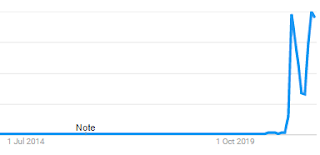

nft trends
NFT

Quite what people expect to find on Fiverr when they search for "NFT" isn't clear. It feels unlikely that $5 will buy you something that you can turn into an NFT that can be exchanged for *gulp* millions, but reading articles such as this one from CNBC about a boy who made a small fortune from Weird Whales proves that anything is possible.

From the chart, the newness of NFT as a search term is obvious. However, it also has 25/25 rising queries in Trends, and 25/25 top queries, which hints that it may be more than a flash in the pan. Here's the top 5 rising queries that mention "NFT":

  • opensea nft
  • nft games
  • nft art finance
  • what is a nft
  • how to buy nft

There are plenty more, and they are all Breakout. If you are a techie, who knows about NFTs, and you can find an angle on Fiverr, this is the one that I'd be pushing: offering content to affiliates providing NFT services.

I'll see you there, selling pickaxes and not gold.

Summary

The above is a very brief skim across the top, as a demonstration of how you should treat strategic keyword research when considering either helping existing freelancers on a platform like Fiverr. Remember that it's far easier to sell shovels, picks, and denim workwear than it is to mine a diamond or chunk of gold.

Please reach out in the comments below to discuss any of the above, or request a one-on-one session to explore keyword research and content strategies for your own projects.

Sources & Resources


Tuesday, 28 August 2018

Why Every Site Needs a Search Engine

This article gives you two ways you can implement site-specific searches on your web page. Think of it as like having your own site-wide search engine. The question is: why should you do it?

It's simple, really: keywords used by your target market are part of your marketing resources. They help in market research, market development, and outreach marketing.

Search terms used by your visitors tell you what they want to see on your site. They also tell you how you should be marketing your site, what content you you should be producing, and how items should be listed for sale.

However, it can be tricky to make the most of this valuable information, and capturing it through various plug-ins is not always straightforward, or cheap.

Both these techniques are highly transparent, and free to use; my advice is to start using on-site search to monitor your existing market and build out your strategic keyword management process using the data that you gather as a result.

The Simple Search Solution

Use Google site search.

The background to this approach is represented by the following Google query:

  • site:searchengineland.com keyword research

This simple instruction tells Google to only return results for the site mentioned. This is convenient for site owners who want to check their coverage of keyword terms, but also very convenient if you want to provide a site specific search function.

The only caveat is that the pages must be indexed by Google.

Drop-In Javascript

There are two parts to the solution:

  • The HTML for the search form;
  • The Javascript to open the search.

Refinements on the following drop-in HTML and Javascript are many and various:

  • open the search in a new window;
  • open the search in an inline frame;
  • use various search modifiers to steer the result;
  • etc.
The one major advantage is that you'll see, in your web traffic statistics, the search terms being used to query Google. This means that you can check that people are coming to your site for the right reasons, and, crucially, check that you're still serving them to the best of your ability.

Here's the basic HTML:

<input id="search query" type="text" />
<button 
onClick="window.location.href=submitSearch(document.getElementById('search_query').value);">
Search</button>

All that this does is call the Javascript function submitSearch (defined below) with the contents of the text input (that's what all that getElementById code does), and then set the URL of the current page to the result of the submitSearch function.

Here's the Javascript (stick it at the top of the page, in the head section):

<script type="text/javascript">
function submitSearch(search_query) {
  search_domain = encodeURIComponent('site:your-domain.com');
  search_text = '+"' + search_query.replace(" ", "+") + '"';
  return search_domain + search_text;
}
</script>

This snippet forms the query out of the site and the query text, making sure that it is safe for use in a URL. Important: you should replace your-domain.com with your own domain.

The result is a Google search page, containing results for the keywords typed in by the visitor, restricted to pages from your site. In your logging, you will then see an Exit with the URL, inclduign the keywords.

Note that this doesn't work for sub-domains terribly well; so, for it to work, you will need to buy your own domain name, even if you only use it to point to Blogger!

More Advanced Options

Create a Google Custom Search engine, and add it to your site.

There are a few pre-requisites:

  • Your site is registered in Search Console;
  • You have Google Analytics set up.

The process is relatively painless, if a little technical. However, as always, the Google help on the topic is pretty good, and as long as you can edit your web site HTML, it should be fairly straightforward.

A big plus for bloggers, especially, is that it can be monetised via AdSense, too.

Tip: You get a bit more power, and advanced analytics (thanks to integration with Google Analytics and Search Console) including the ability to use sub-domains.

So, What Now?

The worst thing you can do is nothing.

At a minimum you need to give your site users a decent way to search your content for something that is meaningful to them. The next worst thing would be not to track the things they look for.

Google has tried to make this a bit more opaque, in the name of privacy. They hide the content of query strings made by users who are logged into their Google account, for example. However, you should attempt to get as much search data from your own site as possible.

Why?

The reasoning is simple: if a visitor comes to your site, looking for something specific and can't find it, it's your responsibility to make sure that you supply it.

This is how market research operates. Strategic keyword management - treating your pool of available SEO friendly keyword phrases as a valuable business resource - relies on market research.

Without it, you're just throwing spaghetti at the wall, hoping that some of it sticks.

Monday, 2 January 2017

3 Hot SEO Topics You Missed in 2016!

One of the perennial SEO tasks that hits in January is the usual debate over which of the hundreds of search signals you should pay attention to for the coming year.

2016 has been interesting for a lot of reasons, and in search there have been some trends that might have passed you by.

Firstly, though, I'd like to pull out the usual advice that I give clients in January: make a search engine marketing plan. That includes, as always, three things that you didn't do last year, and will do this year, and disposes of three things that didn't work out.

If tyou don't find three things that didn't work out, then either you weren't paying attention, or you haven't been tracking your SEO and SEM activities.

At least that gives you something to put on the 'To Do More Of' list in 2017.

Here's the three things that are most common to my search clients for 2017 and which everyone should continue to do, or start doing in earnest.

Mobile & Local


Right off the bat, making web pages mobile friendly has to be a priority if, like many, you have sidestepped the topic over the past year.

It's more than just moving to a responsive theme on your blog; embracing mobile properly also means:

  • checking the mobile-friendliness of advertising network partners;
  • double-checking plug-in mobile compatibility;
  • creating content with mobile in mind, selectively published for mobile devices.

This last goes hand in hand with local search.

There are a lot of searches that tend to be done on mobile platforms that are also local. The image I like to use is that of a person in the street, using their mobile device to compare prices and make bookings for beauty treatments at neighbouring, competing salons.

It happens. It will happen more frequently in 2017 than 2016, so get used to it.

User First


For 2017, everyone needs to put their users (readers, customers, clients or audience) first in their SEO and SEM activities.

Not the search engines. There are still too many people who look at this as a technology issue, when it isn't any more. The symptom is putting search engines first (i.e. white hat optimisation and near keyword-stuffing) and the cure is user-first SEM.

That means:

  • better content;
  • responding to needs;
  • testing the balance of information-to-sale.

The first one is easy. Have a content plan, based on keyword research, using the full plethora of tools available, and apply it every step of the way. Make it interesting, personal, and relevant.

That means responding to the needs of the audience. If video works best, give them video. If it's how-to PDF files they're after, then create a content plan around that. Check out the questions they are asking, and then give them best-in-class content to answer the questions, and a best-in-class product to go with it.

Of course, that means paying attention to tracking results. It's time to install trackers, pay attention to Search Console and Analytics and make sure you know what works every step of the way, and then replicate it across the content delivery platform.

Keyword Research for RankBrain


Google's gotten smarter in 2016.

The introduction of RankBrain means that your content has multiple meanings to a search engine. The best bit about this is that you don't need to create different pieces of content for different audiences, when they are semantically close in search space.

The slightly troublesome aspect is that you should be a lot more attuned to concepts for your content, and concentrate much less on exact words to represent it.

Yes, you can still use keyword research to uncover your audience's needs, but when it comes to content creation, use the full richness of language to get your ideas across, rather than trying to target a single phrase. It's a tricky balance, but with practice one that is fairly easy to get right.

So, as you go into 2017 with your content marketing plan rolled up under your arm, keyed to topics that you have proven will attract traffic, just remember that it's about the end user, not trying to get free organic traffic at any cost to quality content delivery.

If you want one-on-one help building a search engine marketing plan for 2017, then please use this form to request a free web site evaluation.

Saturday, 10 December 2016

Keyword Research Competitor Analysis Tips and Tricks

In this article we will look at a few tips and tricks related to keyword research competitor analysis.

I'm going to assume that your target page isn't as high up in the SERPs as you would like, and that you have done some basic strategic keyword research to figure out which keyword phrases you should be targeting (depending on whether you have picked a Value or Volume keyword selection strategy.)

The reason the selection strategy matters is because the first technique is entirely keyword driven.

Search Competitor Analysis


Before anything else, you need to know who is in the Top 10 for your target keyword phrase.

The easiest way to do this is to go to your search engine of choice, and type in your search phrase as a query. Here are some important key points:

  • make sure you conduct the search in an "anonymous" browser session (also called InPrivate);
  • set the right geographic context by using the correct location-based engine URL (i.e. .co.uk/.com/.fr etc.);
  • start with a narrow match (i.e. put the keywords "in quotes").

Once you have your list of direct search engine result page competitors, open each target link in a new window, and copy and paste the URL to a notepad or spreadsheet. Do as many as you see fit, across a wide spectrum of URLs (if a lot of them come from so-called "content farms" be wary), but make sure you have at least 10 unique domains / sub-domains.

Keyword Density


Once you've figured out who the competition is, use a tool like SEO Tools Keyword Density Checker to make a list of the one, two and three word keyword phrases, and rank them according to their relative density.

Why does this matter?

Keyword density is one of those measures that used to have recommended hard and fast rules about what the number should be. In the early days, keyword stuffing, a technique that consisted of repeating the target keyword phrase as often as possible in an article got results.

These days, however, search engines "recognise keyword stuffing as a disingenuous tactic" at best (source: Enge et al (2010) The Art of SEO, US:O'Reilly, p. 211) and "can actually get your pages devalued via search engine penalties" at worst (ibid).

Using the tool is easy: just plug in the page that you have identified as being in competition with your own, and then pick out the keywords and their relative densities from the resulting list. Now you know two things:

  • the best keywords;
  • the densities that are currently working.

Of course, the more pages you analyse, the better your keyword density research will be, and since the results are always relative to your own performance, you should also conduct the same exercise on one of your own pages.

Strategic Keyword Competitor Analysis


Another tactic you can use to expose keyword phrases that your competitors are targeting is to copy and paste the URL into the AdWords Keyword Planner tool.

In the same way that the SEO Tools utility above picks out keyword phrases, the Keyword Planner will analyse the content of the page, and pick up keywords from the Google and AdWords' keyword databases.

The result is a list that can be used to create content to rival that which is being put out by the competition, lifted from their own text. Incidentally, the technique can also be used as a cross check for your own content (to make sure Google is picking up the right keyword phrases) or s a way to pick out keywords to target with an AdWords campaign.

The Keyword Coach Keyword Research Tutorials are a good place to start if you need some tips on how to analyse the resulting lists of keyword and search data, or just search the blog for "long tail keywords".

Processing lists of keywords to find those that match your strategy is a useful skill to learn, and the Keyword Planner results are a great (free) data source to start with.

Finally, the SEMRush tool is great for giving you an overview of your competition, and the keywords that they are targeting. What's great is that it works well for sub-domains as well as domains. However the tool performs but less well for pages on a domain.

Maintaining a list of keywords that are preferred by the competition is a good way to add keyword research and keyword marketing to your ongoing competitive advantage, just assign some time in your keyword research strategy and process to apply these techniques and stay ahead of the pack!

Thursday, 8 December 2016

Keyword Research for Hotel SEO Strategy

With direct bookings both more profitable and becoming more frequent, it pays to have a keyword research and SEO strategy specifically tailored to the hospitality industry. There are two drivers for this:

  • Search engines become smarter and attuned to local search;
  • Consumers becoming more comfortable booking online.

While sites like TripAdvisor and Expedia are also key to a hotel's success and cannot be ignored, more and more consumers are turning to Google first to find their perfect getaway location.

Along with some excellent advice in the Hospitality Net article "How to Jumpstart Your Hotel's Direct Bookings Through Search Engine Marketing" there are some surprising figures to back this up. According to the article 61% of potential customers come through a search engine with a 20% year on year increase in relevant searches performed on Google.

This would indicate that SEO is going to be a deciding factor in a hotel's long-term direct booking success.

Hotel SEO Strategy 


While it is entirely possible to reduce the SEO process through concentrating on "7 Steps for Your Small Business Survival" (NuWireInvestor web site) including local search, social engagement and creating attractive, valuable content, many experts seem to gloss over the keyword research strategy as part of the marketing process.

Search engine optimisation (SEO) and search engine marketing (SEM) both rely heavily on an integrated keyword management strategy, and so it is surprising that it doesn't seem to get the emphasis that it richly deserves.

For example: while a long tail keyword research policy can help identify a good starting point for SEO and SEM activities, unless it becomes part of a test, measure and adjust cycle the research will always be second hand.

Keywords are the communication conduit between your target market and your hospitality offering, so properly researching them ought to be a priority: and conducted by a keyword research specialist rather than consigned to being merely part of the SEO/SEM process.

Keyword Research for Hotels


For those who have the time and confidence to go it alone, here are a few salient tips from the trenches of keyword research strategy.

Firstly, local search is highly important. Search engines can not only deal with hyper specific local searches (such as "hotel near <landmark> in <city>") but also there is a rise of the "near me" syndrome: as in "hotel near me".

However, this last is also very location-specific, so the key takeaway here has to be to remember to use geographic targeting when researching keyword usage using a tool such as the Keyword Planner.

There is a big difference between a search conducted locally ("hotel near me") and a search conducted for a location ("hotel near new york grand central station"), and this difference needs to be reflected in the SEO/SEM strategy and in the keyword research.

Next, review local restaurants, landmarks, museums, events and places of local interest in order to generate useful, valuable, attractive content, but make sure you concentrate on those that qualify in one of two ways:

  • high search volume
  • long-tail low-traffic low-competition

The first is obvious; it takes very little effort to create a piece of content highly optimised towards a very popular attraction, and if it has a very high number of requests you may find yourself with a (small) piece of a large traffic pie.

The second might not be so obvious. However, if your hotel is the only one where a visitor from out of town can get a great idea of what the event (restaurant, attraction, landmark, etc.) has to offer, then you will naturally score highly and attract high conversion rates.

Finally, remember to go for social sharing and engagement with other local businesses. For example, consider writing a piece that is highly optimised towards your chosen long tail keywords (i.e. "hotel near conference center in miami with sauna" -- I made that up, by the way!) and encouraging other local businesses to publish it, and link out to your site from theirs.

At the same time, use social keyword research to find out what conversations people are having about hotels and facilities in your area, and then jump in on the conversations with opinion (and links to your hotel booking facility) as well as using that keyword research to fuel content creation.

All of this takes time, granted, but is worth the extra effort. While The Keyword Coach has some very reasonable plans (you can take us for a test drive for $5!), there's no reason why computer literate, internet savvy hoteliers with time on their hands can't use the information in our keyword research and SEO tutorials to make a start on their own.

Just remember: Research, Test, Track, Adjust.

Monday, 28 November 2016

Defining a Basic Keyword Research Process

A basic keyword research process must start with an understanding of:

  • What the goals are;
  • Where the keywords are to be used;
  • How a successful campaign will be measured.

If you can answer thee questions, then you stand a chance of being able to develop your own repeatable keyword research process. It is important that the process is both repeatable and measurable, as well as being easy to perform.

Unless you are outsourcing your keyword research tasks, you should aim to keep the process simple, and constrained. It is easy to waste a lot of effort trying to uncover the next big thing in your niche, but if you keep the focus narrow, you stand a greater chance of success.

What Are Your Keyword Research Goals?

The first thing to ascertain is what you want to use the keyword research for, as this will influence the tools and processes that you use. For example, you could want to get more traffic, in which case your evaluation of keywords will be skewed towards Search Volume.

On the other hand, if you want to increase conversion rates (get more sales), then a slightly more sophisticated approach needs to be taken, where you identify trigger words as well as identifying phrases associated with higher Cost Per Click figures.

A higher CPC usually means that there is money in the niche available for advertising, but the other side of the coin is that you might be looking for ways to reduce advertising expenses. Therefore, looking for High Volume, Low CPC keywords will also play a part in the research process.

Where Are The Keywords to be Used?

Having decided what the outcome should be, you then need to consider where the keyword phrases will be used. Clearly the two questions are linked, most obviously through the use of keyword phrases in a PPC campaign.

This will lead to different selections than, for example, keywords that are to be used for on-page SEO (search engine optimisation).

And, off-page SEO (inbound marketing) use will also influence the choice of keyword phrases, especially in relation to trigger words, and words which enhance brand image.

How Will You Measure Success?

Finally, in order to know if the keyword research process has worked, you need to be able to measure the impact of using the keywords. Common measures include:

  • Engagement - how much traffic, how many repeat visitors, ratio of repeat visitors to sales, etc.
  • Stickiness - when visitors land on the site, how long do they spend engaging with it?
  • Hits - the raw number of visits / per page.
  • Conversions - how many visitors become customers?

There are other important measures, but if you at least concentrate on one or two of the above in the first instance, you will begin to see the benefits of the keyword research process. It is an investment in your underlying business, rather than the bolt-on that many people seem to see it as.

However, to enjoy those benefits, a proper process must be followed.

Define an Appropriate Keyword Research Process

The process itself will have four phases:

  • Research - defining the root keyword phrases;
  • Expand - taking each root keyword phrase and finding long tail keyword phrases;
  • Analyse - checking the past performance of each phrase;
  • Deploy - put the keywords to use, and check the results!

To help in the Research phase, I've listed my favourite free keyword generator tools, with a brief how-to for each. In order to help you Expand into a complete basket of keywords, the long tail keyword generator process explained on the blog is an excellent starting point.

The techniques from the Research ad Expand phases also contain elements that enable you to Analyse keywords: for example, extensive use is made of tools such as the Keyword Planner (AdWords) to help determine search volume and anticipated cost per click.

Finally, the Deploy phase is all about using the keywords and seeing what effect they have. It doesn't need to be complex, but it is important that you stick with a defined process in order to generate repeatable results.

My advice is to start with The Keyword Coach PDCA / Smart goal setting process tailored to keyword research, and extend it according to your own needs. The best way to get started is by actually running a small project and seeing where your niche and business will benefit most from an integrated basic keyword research process.

Friday, 9 September 2016

3 Simple Ways to Multiply Keyword Effectiveness: Immediately!

A big part of my philosophy for strategic keyword management centres around three core activities:

  • Knowing how people become aware of your site;
  • Tracking how many of them actually visit your site;
  • Observing what they do whet they get there.

Retailers who have primarily a bricks and mortar establishment can substitute "site" for "shop", "salon", "showroom", "office", and so on. The principle is the same; this isn't about pure SEO.

So, why are these three aspects of keyword research so important?

Keywords Help People to Find You

It doesn't matter whether you are the author of a book, a web site owner, or run a seaside café, people find you because they have needs or desires.

They will express those needs and desires in keywords; whether they want to ask someone in the street, or search online.

Someone who is looking for a latté in Bournemouth is going to be a lot more interested in a café that has a big sign in the window saying "Best Latté in Bournemouth or Your Money Back!" than one offering "Cut Price Cream Teas for Students".

It's the same online.

When someone performs a query, they're only going to click on a site that appears to confirm their needs or desires through the use of keywords. Not just the keywords they type, by the way, but also those that make one sit more attractive than another.

Knowing what keywords people have used to find your site (whether they've clicked through or not) is useful. It's also a measurable statistic provided by the Search Console, and also, via integration with SC, in StatCounter.com (although they still call it GWT!)

And, this metric is also useful offline: just ask customers how they found you, and from that you'll quickly work out what internal keywords they had in their minds when they made the decision to choose your establishment compared to the others on the high street.

Doing this analysis -- and acting on the results -- takes you from merely advertising, to attracting.

Measuring Attraction Helps Build a Better Campaign


Once you know which keywords are getting you visibility, you need to know which of them are also getting you visitors, or better still, customers.

Typically, a keyword campaign can have one of several goals:
  • building awareness;
  • attracting new customers;
  • re-attracting existing customers;
In the first case, all you want to know is whether your brand is getting seen. Search engines are making that a lot easier these days by including extracts from the landing page associated with a keyword alongside the result.

Managing that meta-data is a vital part of SEO.

The second case is linked to actions. You need to know, having gained awareness, which conjunction of keywords and search entry lead to action. That means putting non-active keywords in the meta-data so that it is displayed.

A non-active keyword is one that is not part of the keyword phrase which defines the primary motive for a search user: for example, the query "latté bournemouth" will return a page of results, and if one of the displayed meta-data snippets contains the word 'free', that café may well find the attract more custom, but "free" is not an active keyword.

The resulting campaign may well be a combination of the active and non-active keywords, for example, a PPC campaign using the keyword phrase 'free latté bournemouth'. 

(I'm not saying that's necessarily an example that will work in the real world, by the way, but if you go through the motions, the result may well be positive!)

Finally, using trackable keyword phrases in your re-activation campaigns also helps to improve them; re-attracting customers by email or physical mailing is much easier if you have researched the keywords that your target market uses to find your competitors.

All of these work online as well as offline. Offline measurement methods just tend to be a bit more involved. Offline or not, however, measuring the behaviour that stems from a simple customer visit provides the best measure of how effective a keyword campaign has been.

Behavioural Analysis Measures the Effectiveness of Keywords


There used to be -- actually, I still use a variation -- a measure called KEI. This stands for Keyword Effectiveness Index, and was supposed to represent the relative ease with which it was possible to score highly in the SERPs.

It was a simple measure: all it really did was manipulate the anticipated volume and number of competing sites to try and gauge your chances of hitting the top 10.

Here's a funny anecdote, though.

On one of my own sites that I use for researching strategies, I have a highly effective keyword that isn't in the top 10. It's barely in the top 100. And, in terms of the CTR alone, it's reasonably effective:
What's more, as you can see from the screen shot, it's also not an isolated case; there's one right next to it with a similarly impressive CTR.

When I dig into the "Visitor Activity" log provided by StatCounter.com, I can see that, for the target market, these queries both have above average engagement based on the landing page:

  • higher visit time
  • more pages viewed
  • repeat visits

This view is derived from knowing which page a visitor is likely to land on as a result of the query (by conducting a live query) and reviewing the Visitor Activity for that URL.

Expanding the search to related pages confirms that this query is more effective than many that appear nearer the top of the SERPs. That is, for the pages that are also returned as a result (but even lower down the SERPs) they also show high levels of engagement and conversion.

This is part of the attraction of the so-called long tail, of course. More specific pages with highly niche information that don't necessarily attract the most traffic are quite often the most effective when measured in terms unrelated to pure volume and cost.

Bigger, as they say, is not always better.

For a solid, step by step approach to keyword research that has consistently proven to be unaffected by algorithm changes, download the Keyword Research Blueprint!

Wednesday, 24 August 2016

Plan Do Check Act, SMART Goals and A/B Split Testing

Split testing is a valuable part of strategic keyword management. For a start, it allows you to throw away those keywords that aren't bringing in the results -- but at the same time, it gives you an opportunity to improve on so many areas of your retail marketing effort that learning it is a transferable skill in itself.

Of course, this article looks at split testing from the point of view of keyword management, but it can be, and has been, applied to all kinds of result-dependent activity.

By result-dependent we mean an activity that has a clearly defined and measurable goal; one which produces results that further our guiding strategy.

In strategic management terms, these are results that keep us in line with our mission and contribute to a sustainable competitive advantage.

At the core is something that I may well have alluded to before: PDCA.

Plan Do Check Act


The PDCA cycle (also known as Deming's Cycle) is something that I first came across in the context of process improvement. For a great overview, try the US Navy's Handbook for Basic Process Improvement, which is part of their Strategic Planning collection of documents.

(It's pretty lengthy, so don't get sidetracked, but there's a lot of useful flowcharts in there that can be easily applied to outsourced projects i.e. manual keyword expansion from a root keyword phrase, and checking of vital keyword effectiveness metrics against baseline measurements, and so on.)

The point of PDCA is that you first make a plan. Then, you carry out a process that has been created to achieve the goal set out in the plan.

Next comes a period of checking -- were the expected results achieved? -- and adjusting the process (the Do) part so that there is a higher chance of achieving the goals set out in the Plan.

In a nutshell, that's the Deming cycle, and it can be applied to a lot of different activities. Such as: A/B split testing of keyword rich headlines that form part of an advert campaign (on AdSense, for example).

However, before we look at A/B split testing (the process, or 'Do' part), we need to make sure that we understand what it is supposed to achieve. For that, I like to use SMART goals.

SMART Goals


There's a great discussion of the various meanings behind the SMART moniker on the Project Smart web site. While you're free to choose a set that make sense to you, here's what I recommend:

  • S : specific (i.e. not at all vague)
  • M : measurable (i.e. numerically)
  • A : achievable (i.e. not unrealistic)
  • R : results-oriented (i.e. has to take you to where you want to go)
  • T : time-bound (i.e. set a time and/or cost limit)

In this case, your goal might be to increase click-through rates by 1% within 6 months by varying keyword placement in an advert heading.

The goal is set, but what is the process that will deliver the desired result?

A/B Split Testing


The driving principle behind A/B split testing is that you have two test cases, and you want to see which one performs the best. When you find that out, you devise another case and pitch it against the current best performer.

It sounds simple... and it is.

Within our PDCA process, it's the 'Do' part:

  • Plan : "increase click-through rates by 1% within 6 months by varying keyword placement in an advert heading";
  • Do : execute split testing for up to 6 months (or when CTRs increase by 1%)
  • Check : did we achieve the goal?
  • Act : if not, how can we improve/change the process?
The point is that Google AdWords will present you with hundreds of keyword phrases, along with data to help you pick the best one. But, it's the best one from Google's point of view, or at a push the best one that's identified using anonymised data.

It might not be the best one for you.

By split testing across candidate keywords, you can easily figure out which gives you the best return on your investment. Here, we've only put the goal in terms of CTR, but it could equally have been oriented around the eventual action of the visitor.

I've also talked about varying keyword phrases, but what about varying the words around those phrases? A great source of variations can be found in a free eBook "87 Marketing Secrets of the Written Word" by the legendary Ted Nicholas (link goes to his main site, and isn't an affiliate link.)

By picking carefully and pitching different combinations of words against each other, you will quickly build up a reliable list of variations for your chosen niche, as long as you follow PDCA, SMART and A/B Split Testing principles.

Tuesday, 23 August 2016

On Tools & Conversion Rates: Notes from the Trenches of Strategic Keyword Management

Today, you get a twofer: as in, two for one.

Firstly, an update on this post about tools being put beyond use. Now, I'm not going to name names, but two of the tools I pay for and use regularly have been put beyond use (albeit temporarily) thanks to an AdWords change in the Keyword Planner.

Remember that I postulated that this was, at least, one tool that wouldn't be changed in a hurry?

It turns out I was partially wrong. In their recent article "Google says bots are the main target of Keyword Planner changes", Search Engine Land's Ginny Marvin says the following:

"The reality is that Google’s keyword research tools were designed to help advertisers develop their search campaigns. The availability of the External Keyword Tool for years, however, set expectations that it should be open and available to all."

For those who are unaware of the pending changes -- I say pending, because not everyone will be affected straight away, and it's likely that different accounts will be affected in different ways  -- they centre around restricting data to accounts that have been designated as research-only.

In other words, if you don't spend with AdWords, then you don't get the data.

Economically, with my academic hat on, it makes sense. Strategically, though, it's a bit at odds with Alphabet's Don't be Evil mantra, and the SEO / KWR part of me can't help but think that limiting data that helps content creators research what people are looking for, and willing to pay for, is only going to result in content blanket bombing and post-publication keyword research.

In other words, we're going to go back to speculative content spinning around known search terms, just to see where the content gets placed in Google's index (via the Search Console and Analytics reports) rather than pro-active keyword research.

While reactive keyword research -- as I call it -- certainly has its place in your keyword research toolbox, what we don't want is a sudden glut of spun content designed to test the viability of keywords, and provide no real value.

Meanwhile, the tools I mentioned? They rely on API access, and seem to be being throttled, either by the tool's creator, or by the API limits, such that they have ceased working. I'm sure a fix is in the works, and I have standby techniques that, while a bit more long winded, get me to the same place.

A case of do as I say, and as I do, for once!

Meanwhile on a more positive note...

There's a great graph on Jason Tabeling's Search Engine Watch article "Online-to-offline search value is exploding with 'near me' searches"that illustrates something that I've been pushing out to retail clients for a while now.

In a recent post "How Keyword Research can help High Street Retailers", I pointed out that many people are now comparing retailers on the high street whilst actually being on the high street with mobile devices in hand.

The anecdotal evidence is borne out by Tabeling's research, and it turns out that "near me" searches are pretty likely to be conducted on a mobile device, which is interesting.

More interesting from a retailer's point of view is his assertion that advertisers "are paying 30% more for 'near me' searches compared to searches with other terms, even though our data showed literally ZERO conversions for 'near me' terms."

Readers of my "Cheat Sheet" eBook will know that part of the strategic management of keywords pivots around PPC campaigns, and looking for the money in the market (think Search Volume x Cost Per Click).

Tabeling's research shows that 'near me' searches attract a very high CPC, have solid volume, but don't get the clicks. In other words, advertisers are spending for the sole purpose of exposure -- probably with their physical address -- near the top of the SERPs, or in AdSense side-bars.

He suggests that it's time for all advertisers -- and I would say, clicks'n'bricks retailers especially -- to review how they track conversion rates for so-called online-to-offline traffic, as in this new digital advertising reality, conversion "might not be from the traditional online search, but from a find a store visit or a click-to-call action."

Measuring the ROI might not be the simplest part of strategic keyword management, but as in other aspects of retail, it is vital to know how much you are getting back for the spend that is being forced upon you.

Friday, 19 August 2016

What if All Your Keyword Research Tools Disappeared Overnight?

How To Avoid This Often Terminal SEO Mistake

Recently I had a client whose favourite -- indeed only -- keyword research tool had been put beyond use.

Behind the initial panic was the growing realisation that they didn’t actually know how the tool did what it did. It was selecting excellent keywords, and had served her well in the past, but she had no idea how it worked under the hood.

To be clear on this point: “put beyond use” can mean any one of the following:

  • A temporary glitch;
  • The provider went out of business;
  • The fees went up beyond your capacity to pay them;
  • The source of the data that the provider was using was put beyond use.

The first is easy: it’s a waiting game. Just make sure that you are always a few days (or weeks) ahead of the data point. In other words, don’t leave it until the last minute to have a basket of keywords to work with: use seasonal and outlier analysis to keep ahead of the game!

The rest of the items in the above list are catastrophic if you have no idea how to replicate the service manually.

So, here’s the first lesson: don’t use metrics provided by third parties that you can’t replicate manually. Any services you use should merely be time-saving conveniences; if they have special sauce, one day you’ll be left with only a dry bowl of pasta.

You’ll still eat, but it won’t be pleasant...

Make Sure You Have An SEO Plan B


Even if the absolute worst case scenario is manual calculation using the most basic tools, it’s better than nothing. With the right preparation, it can be outsourced, releasing you to perform business functions that add value to your proposition.

For every SEO action -- from keyword research to social posting and link building -- make sure you have an alternative to the time-saving tools you use on a daily basis. There are some that you can’t do without (Google Search, AdWords, and the actual social networks themselves, for example) but make sure that these are:

  • In the minority;
  • Unlikely to be put beyond use.

In the keyword research field, we often deploy third party tools that gather up data and then present it in a way that lets us draw conclusions. For example, the AdWords Keyword Planner, or SEMRush analysis tools pull together a number of data points -- some proprietary, some not -- as a way to save time.

Decision tools such as Market Samurai, and automation tools like KeywordTool.io and Power Suggest Pro*, also fall into the category of must-haves for people embarking on serious strategic keyword management projects.

As long as these are used as labour saving devices, and not crutches, that’s okay. In fact, although I used -- and have paid -- for some of the above, I never use them for anything except baseline research: just the numbers.

For decision-making, I prefer to rely on my own metrics, which sometimes includes charting the data and just using my eyes. However, I do have three so-called ‘first cut’ metrics that I’ve rolled together to help make sure I weed out the non-starters.

These are automated, but could be done manually, if my toys get taken away from me!

Create Your Own Keyword Research (and SEO) Metrics


Probably the most important metrics are those I call ‘first cut’. The idea is to cut away a first set of keywords that aren’t likely to be useful. The metric that you use tends to be one of the following:

  • Pure volume - search volume vs. results returned;
  • Market value - amount of free advertising capital in the niche;
  • PPC Campaign - reducing the cost of a PPC campaign for maximum exposure.

Obviously, to calculate these, you will need tools. For example, my own go-to metric for a pure volume project is to emphasis the addressable market over the sheer number of searches: sometimes referred to as the KEI.

To calculate the KEI, you will at least need two numbers:

  • Search Volume
  • Number of Results

The second of these is easy enough to scrape from a Google Search (either manually, or with a simple script) but the Search Volume is only really available via the AdWords Keyword Planner.

The same is true for the market value metric, where the anticipated cost per click is used to test a keyword for available advertising spend against search performance, and picking outliers for inclusion.

Again, Keyword Planner is the only real source; luckily it is unlikely to be put beyond use for the foreseeable future, as it supports most of the Google keyword economy.

That’s good, because the last first cut metric, specifically used to remove expensive keywords, is almost the opposite of the market value metric, and specifically uses data from Keyword Planner.

Tools can help apply all of these metrics: for example, Market Samurai can be set up to filter for commerciality, or cheap keywords, and remove everything else. However, if you don’t know how to do the work manually, and those tools are taken away, you’ll be unable to replicate the results and you’ll have to start from scratch.

Learning how to calculate first cut metrics isn’t a good thing to have to do in a hurry. The best advice is to start now, and roll your own set of metrics: not only will you have a safety net, but you'll also learn a lot in the process. I guarantee it!

-----------------------------------------------------------------------------
* Disclosure: I participate in the Power Suggest Pro Affiliate Scheme, and the article link is an affiliate link. If you prefer not to click it, use www.powersuggestpro.com instead.

Tuesday, 9 August 2016

Zero Traffic Keyword Research Technique To Maximise Results

Recently, I had a client who was panicking over a new blog. For affiliates, who make their money selling other people’s products, using their own content to create the opportunity to make a sale and build a list, a lack of traffic is somewhat disturbing.

However, just because a page has no hits, it doesn’t mean that it hasn’t been seen.

In fact, it’s likely to have been seen by the one entity that could make a difference: the Googlebot. Not only that, but if it has been indexed, the message is probably getting in front of an audience -- even a limited one -- something which can come as a surprise for those new to keyword research and search engine optimisation.

Search Console: Your Personal SEO Keyword Search Tool


To help website owners, Google used to have a tool known as the GWT (Google Webmaster Tools) which linked Analytics to Search. Since GWT was a bit of a misnomer, Google renamed it to Search Console.

It does what it says on the tin: it is a website owner's view on search, from Google’s point of view.

Take a look at the following screenshot:


At first sight, it’s a bit worrying. There are clearly no page views, which means that there will be a CTR (click through ratio) of 0%. Usually, SC is used to track the effectiveness of keywords in terms of that ratio. Without it, clients start to panic.

However, the Search Console also reveals some other interesting statistics which are a veritable goldmine for someone who helps webmasters boost their traffic on the back of strategic keyword management.

Let’s add a few more bits of information to the table:


Now, we can see that Google has not only indexed the pages on the site, but also ranked them, and displayed the listings to potential customers. Okay, so they are well down in the rankings (5.5 - 42.0 isn’t a great result, by any stretch), but at least the following is being seen in the results:

  • The title;
  • The meta data;
  • The summary content.

What’s more, SC is also telling us for which specific keywords the Googlebot has indexed the content. Now, the question is -- are these the keywords that represent the content accurately?

If you conduct outlier analysis on a scatter graph of CTR against SERP (Position or Rank), you’ll see, for a crowded list of keywords, that in the upper right quadrant, where the CTR is high, and where results are well down in the SERPs, some keywords that just pull in clicks:


The analysis of this behaviour is that there are some parts of any market that will not only trawl through ten pages of results, but also still click on them if they meet their expectations.

This is the so-called “long tail traffic”, and understanding that where today you get impressions, tomorrow you could be getting clicks can be something of a revelation.

The First Keyword Research Strategy You'll Need!


In fact, central to one of the traffic improvement modules that are used to boost results is known as Zero Traffic Keyword Fishing.

The core idea is that you can create content that has no other purpose than to get Google, via the Search Console, to suggest keywords that have audience outlier properties. To do this, all you have to do is continue to create content, and let Google index it.

Oh, and stop being obsessed with traffic...

Where the traffic improvement comes in is in leveraging something that Ted Nicholas calls “Magic Words” to improve the listing, and then checking to see if the CTR goes up. The CTR is a ratio of impressions (how many times the listing is displayed) against clicking through to your web site.

Remember that we noted that an indexed page has at least the Title and a Summary (from the Metadata) displayed in the SERPs. You can get a view of that content through SC, using the Search Appearance from the main menu.

Specifically, under HTML Improvements, Search Console can point to exactly where modifications should be made to improve performance. After all, Google wants to get your valuable information into the hands of people who will benefit from it, as much as you do!

By making sure that you get magic words* into the text you will have a material effect on the CTR. Beyond that, if you then tweak the page so that it is more relevant, and deploy social media sharing and backlink strategies you will improve SERPs, get more impressions, and, eventually, more clicks.

Just remember to play the long game: content only remains relevant for as long as it delivers value to the target audience.

-------------------------------------------------------------------------------------

*Ted Nicholas has lists of words that improve headline performance in his books, and it would be unprofessional of me to list them all here; however, three obvious ones are: "free", "how to" and, of course, "you".